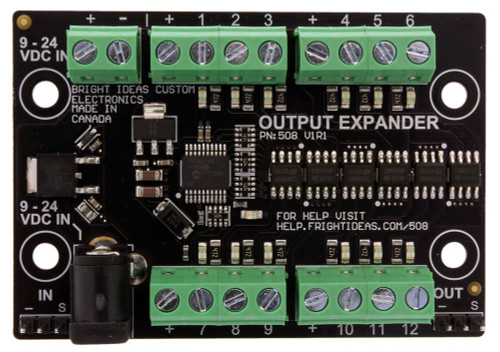


ServoDMX · Eight outputs, expandable to sixteen
Put every movement in your control.
Build a character with multiple RC servos and integrate its movement into a compatible DMX show. Set travel, speed, and acceleration limits to match your mechanics, with audio-responsive mouth control and RGB NeoPixel support.
Choose your configurationWhat’s includedWatch setup videosStart with eight. Expand when your build needs more.
This listing’s base configuration has 8 enabled servo outputs. The optional upgrades above enable 12 or 16 servo outputs. The hardware supports up to 16; the number you can use depends on the configuration purchased.
Enabled servo outputs are different from DMX addressing channels. Choose the output count for the number of servos you need to operate.
At a glance.
| Servo outputs | 8 enabled as standard; optional 12-output or 16-output configuration |
| Output type | RC servo control; configurable low-current on/off signaling |
| DMX | Receives DMX from a compatible controller or software interface |
| Motion settings | Individual travel limits, speed limits, and acceleration limits |
| Audio animation | AutoTalk mouth movement from live or prerecorded audio using the appropriate audio connection |
| RGB lighting | Controls up to 8 compatible NeoPixels |
| Power supply | Optional — choose None, 5V 2A, or 6V 5A above to suit your servos and load |
Choose your configuration.
Servo output upgrade
Leave the upgrade unselected for the base 8-output configuration, or choose 12 or 16 enabled servo outputs for a larger character. Check the displayed price after making your selection.
Power supply
Select a supply that matches the voltage and current requirements of your servos. Choosing None means no power supply is added. A higher current rating provides capacity; it does not make an unsuitable voltage compatible.
For later output unlocks or changes to an assembled skull’s controller, contact us first to confirm the process, required equipment, and applicable warranty terms.
Tune the motion to your character.
Travel, speed & acceleration
Set safe endpoints for each servo, then tune speed and acceleration for smoother motion that suits the mechanics. The control knob can also position servos manually for testing or posing.
Audio & illuminated eyes
AutoTalk lets audio drive the mouth instead of scripting every jaw movement. Compatible NeoPixels add controllable eye color and brightness. Audio source, lighting, and connection cables are separate from the base controller package.
Installation & servicing
Installer settings can lock travel limits and maximum speeds. Startup positions, servo replacement trimming, control profiles, and configurable sleep settings help you maintain a consistent installation.
What’s included—and what you supply.
Included in the base package
- One ServoDMX controller with 8 outputs enabled
- Two mounting feet
- One 2.1 mm power-adapter pigtail
Selected output upgrades and power-supply options are added according to your order.
Plan your complete setup
- Compatible RC servos and character mechanics
- A suitable power supply if you choose None above
- A compatible DMX source and cable for scripted DMX control
- An audio source and appropriate ServoDMX audio cable for AutoTalk
- Compatible NeoPixels and wiring if required
- Audio playback and amplification equipment for your sound
Ask us to check your equipment list before ordering.
How it fits into your show.
Typical scripted setup: compatible show controller → DMX connection → ServoDMX → your character’s servos.
A BooBox Flex 2 with DMX enabled or a compatible FlexMax 2 configuration can form part of this system. Confirm that your chosen show controller has the required DMX capability.
Director software creates compatible shows. Director Connect is a separate hardware interface used for supported real-time programming and configuration tasks.
From controller to character.
- Plan the outputs and power. Match your enabled servo count, supply voltage, and current capacity to the build.
- Install and calibrate. Follow the manual to set each servo’s travel limits before running the mechanics, then tune speed and acceleration.
- Connect and test your control source. Configure DMX addressing or the required audio/control profile for your application.
ServoTalk or ServoDMX?
| ServoTalk | Three servo outputs for an audio-responsive mouth, eye movement, and head turn. A straightforward choice for a talking character without DMX. |
| ServoDMX | Eight enabled servo outputs in the base configuration with optional expansion, configurable motion limits, and DMX integration for more complex characters. |
Questions before you order.
Is this a complete show controller?
ServoDMX controls the connected servos. A scripted DMX show needs a compatible external source to send the movement instructions. Your audio playback and show triggers must also be planned.
Can I connect a relay?
On/off mode is for low-current control signals. A standard relay coil must not be driven directly from a servo signal output. Use a compatible low-current relay interface and follow its specifications.
Is it supplied pre-calibrated for my prop?
A standalone controller needs its limits configured for your mechanics. Our assembled Full Motion Talking Skull and The Beast include their specified installed and calibrated controller configurations.
Manual & setup videos.
Download the ServoDMX operating manual (PDF)
Watch introduction & setup videosHelp for your build.
Support & manuals · Ask about compatibility · Warranty & terms
Tell us which servos, character mechanics, audio source, and control equipment you plan to use so we can help you choose the right setup.